If your business is not showing on Google Maps and you work out of a van instead of a storefront, the cause is almost always one of eight things — and most of them are settings on your profile, not a penalty.
Service-area businesses break differently than storefronts. A restaurant either has a pin on the map or it does not. A plumber has a hidden address, a service area drawn across dozens of ZIP codes, and a profile that ranks from a point customers never see. That setup creates failure modes a regular local SEO guide will not cover.
This article walks through the eight causes, how to identify which one is yours, and how long each fix takes to show up.
First, Check It the Right Way
Before you change anything, verify that the problem is real. Most panicked searches for «my business is not showing on Google Maps» turn out to be a checking error.
Google personalizes local results heavily. If you are signed into the account that manages the profile, sitting at your business address, searching on the same device you always use, Google will show you your own listing near the top. That result tells you nothing about what a customer three towns over sees.
Here is how to check properly:
- Open an incognito window. This drops your account personalization.
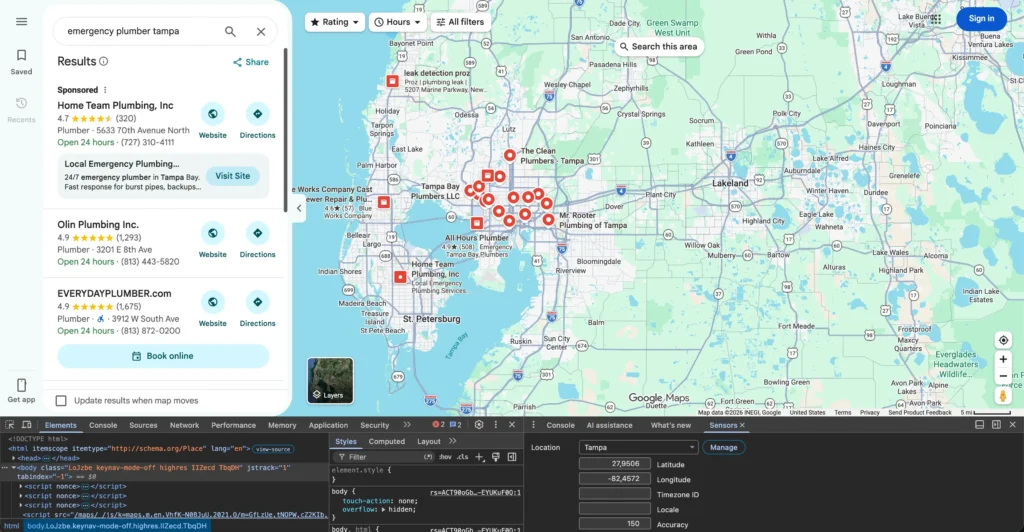
- Override your location in Chrome DevTools. Press F12, open the three-dot menu, choose More tools, then Sensors. Under Location, enter the coordinates of the city you want to check. Now Google thinks you are standing there.
- Search your exact business name first. If the profile appears, it exists and is live. If it does not appear even by exact name, you have a verification, suspension, or duplicate problem.
- Then search your service plus the city — «emergency plumber Tampa», not your brand name. This tells you whether you rank for the searches that actually produce calls.
- Repeat from three points: your address, the middle of your service area, and the far edge.
That last step matters more than anything else in this article. Ranking is measured from where the searcher is standing, so «am I showing on Maps» has a different answer at every point on the map.
If you want a cleaner version of this, a geo-grid tool runs the same query from dozens of coordinates and returns your position at each one. That is what we use when we audit a service-area business, and it turns a vague «we’re not showing up» into a map with numbers on it.
Two Different Problems, and They Need Different Fixes
Everything below splits into two branches. Work out which one you are in before reading further, because the fixes have nothing in common.
| Profile does not appear at all | Profile appears by name, but not by service | |
|---|---|---|
| Symptom | Searching your exact business name in incognito returns nothing | Searching your name works, searching «your service + city» does not |
| What it means | Google is not showing the listing to the public | The listing is live but ranks below the cutoff |
| Likely cause | Not verified, suspended, duplicate, or address conflict | Proximity, category, service area, or weak prominence |
| Covered in | Problems 1, 2, 6, 8 | Problems 3, 4, 5, 7 |
| Typical fix time | Days to weeks | Weeks to months |
If your business is not showing on Google Maps in the first branch, it is a technical problem with a definite answer. A profile that appears but ranks poorly is a competitive problem, and there is no switch to flip.
Problem 1: Your Profile Was Never Verified, or Lost Verification
An unverified Google Business Profile does not show on Google Maps at all. You can see it in your dashboard, fill in every field, and post photos, and none of it reaches the public.
This catches people who created the profile months ago, got a postcard they never received or ignored, and assumed the listing went live anyway.
How to check. Open your Business Profile dashboard. An unverified profile shows a verification prompt at the top — Google will not let you miss it. Also check whether verification lapsed: Google occasionally requires re-verification after major edits, especially changes to name, address, or category.
What to do. Start the verification flow and pick the method Google offers you. For service-area businesses that is usually video verification, where you record a continuous clip showing your location, your equipment or branded vehicle, and proof you manage the business. Get the video right the first time — failed attempts add weeks.
Two things that cause failures for service-area businesses specifically: filming somewhere that does not match the address on the profile, and not showing anything that ties you to the business, like tools, stock, branded vehicle, or business documentation.
Timing. Video verification is often resolved within a few days, though it can take longer. Once approved, the profile typically appears in Maps within a day or two.
Problem 2: Your Address Setup Breaks a Service-Area Business
This is the most common cause on this list, and the one where people most often make the problem worse by guessing.
Google recognizes three setups, and each has different rules:
| Your situation | What Google calls it | Address setting |
|---|---|---|
| Customers never come to you — you drive to them | Service-area business | Hide the address, list service areas |
| Customers visit you and you also travel to them | Hybrid business | Show the address, also list service areas |
| Customers come to you only | Storefront | Show the address, no service areas |
Google’s guidance is direct: if you do not serve customers at your business address, remove the address from your profile and enter a service area instead. The guidelines for representing your business use a plumber working from a residential address as the example — that address should be cleared.
What goes wrong.
Showing a home address you should be hiding. Google filters or suspends profiles that display a residential address with no signage and no customer access. This is one of the most frequent suspension triggers for contractors.
Hiding the address when you should not. If customers do come to your shop, hiding it costs you the storefront ranking advantage and the map pin. Hybrid businesses should show the address.
Using a virtual office, a mailbox, or a coworking desk. Google explicitly disallows this, and it is one of the fastest ways to get suspended. A UPS Store address is not a business location.
Never entering an address at all. You still need a real address for verification, even when it will be hidden. Google’s address documentation covers how to enter one and then turn off «Show business address to customers.»
How to fix it. In your profile, go to Edit profile, then Location. Set the address to your real operating base — your home, your yard, your shop. Then turn off «Show business address to customers» if you are a service-area business. Save, and expect a re-review. A profile can go into pending status for a few days after an address change.
One detail nobody mentions: hiding the address does not move your ranking origin. Google still ranks you from that hidden point. Hiding it protects your privacy and keeps you compliant. It does not make you rank evenly across your service area.
Problem 3: Your Service Area Is Drawn Wrong
Here is the misunderstanding that costs service-area businesses the most: the service areas you list do not create ranking coverage.
Adding 40 cities does not make you eligible to rank in 40 cities. The service area field tells customers where you will travel once they have already found you. It is a communication field, not a targeting field. Your ranking still radiates out from that single hidden address.
Google allows up to 20 service areas per profile and recommends keeping the total within roughly a two-hour drive of your base. Exceeding that does not produce a penalty in most cases, but it does produce a profile that claims a footprint it cannot back up — and a long list of areas can dilute how clearly Google understands your primary market.
A practical rule. List the areas you can genuinely reach and serve in a normal working day. If you would turn down a job there because it is too far, take it off the list. Most contractors are better served by 5 to 10 well-chosen areas than 20 aspirational ones.
What the distance drop-off actually looks like. This is where most articles stop at «proximity matters.» It is measurable. A geo-grid runs your target query from a grid of coordinates across your service area and records your position at each point. The pattern is consistent across every service-area business we have measured: strong near the address, degrading with distance, disappearing entirely past a threshold that depends on how many competitors sit between you and the searcher.
The threshold is not the same for everyone. In a dense metro with 40 competing plumbers, visibility can collapse within a few miles. In a rural county with three competitors, a single profile can cover 25 miles. This is why blanket rules like «you rank within three miles» are unhelpful — the honest answer is that you have to measure your own.
Problem 4: The Proximity Ceiling Nobody Can Remove
Google names three local ranking factors: relevance, distance, and prominence. You control relevance. You can build prominence. Distance is fixed geometry.
If a customer 15 miles away searches «roof repair near me», Google prioritizes businesses near that customer. No amount of profile optimization changes where your address is. Some searches in your service area are simply not winnable through Maps.
Accepting this is useful, because it stops you spending months optimizing a profile for an outcome the system will not produce — and points you at the things that do work for distant cities:
City-specific pages on your website. Maps rankings and organic rankings are different systems. Your profile cannot rank in a city 20 miles out, but a genuinely useful page about your service in that city can rank in the regular organic results below the map pack. The word «genuinely» is load-bearing: a page with the city name swapped into a template is thin content, and Google treats it as such. Real pricing for that area, actual projects, local specifics.
Reviews that mention where the work happened. When customers write «they came out to Brandon and fixed it same day,» that is a geographic signal attached to your profile. You cannot script reviews, but you can ask customers to mention the job and the area in their own words.
Local Services Ads as a stopgap. Google’s own service area documentation points service-area businesses toward Local Services Ads for reach beyond their organic footprint. LSA is pay-per-lead and sits above the map pack. It does not build anything lasting, but it produces calls in areas where your profile cannot compete yet.
Local citations and links from the target area. Prominence is the one lever of the three that you can genuinely move, and it is built off your own site as much as on it.
Problem 5: Category Mismatch
Your primary category is the single strongest relevance signal on the profile. Google matches it against the query before it looks at anything you wrote in your description.
Primary versus secondary. The primary category carries most of the weight. Secondary categories add coverage for related searches but do not compete with the primary. Pick the one that matches your highest-value service, not the broadest one.
Common mistakes contractors make:
- Choosing something generic like «Contractor» when «Roofing Contractor» exists. Specific beats broad every time.
- Loading up on secondary categories that do not describe real services. Irrelevant categories muddy Google’s understanding of what you do.
- Choosing a category that matches your license instead of your searches. Customers search «drain cleaning», not «journeyman plumbing services.»
- Setting it once at signup and never revisiting it. Google adds and retires categories regularly.
How to pick. Search your main service in the city you care about, look at the profiles ranking in the map pack, and check what primary category they use. If every top result uses a category you do not have, that is your answer.
Timing. Category changes sometimes trigger a re-review, and ranking shifts usually take two to four weeks to settle. Change one thing at a time so you can tell what caused what. Our Google Business Profile optimization playbook goes deeper on category selection and the rest of the profile fields.
Problem 6: Duplicate or Conflicting Listings
Duplicates split your signals, and they are a common reason a business is not showing on Google Maps under the profile you actually manage. Reviews land on one profile, your website links point at another, and Google may show the wrong one or filter both.
Service-area businesses accumulate duplicates easily: a profile created at an old address, one auto-generated from web data before you ever claimed anything, one made by a former employee, one from a franchise or a lead-gen company that listed you without asking.
How to find them. Search your business name in Maps. Search your phone number in Maps — this surfaces listings under name variations. Search your old addresses. Check under slight name variations too, like «ABC Plumbing» versus «ABC Plumbing LLC.»
What to do. If you have access to both, use the duplicate removal flow in your Business Profile dashboard. If a duplicate belongs to an account you no longer control, request ownership or report it as a duplicate through Maps. Keep the profile with the review history — reviews do not always transfer, and losing them costs you prominence.
Timing. Duplicate removal requests typically resolve in one to two weeks.
Problem 7: Your NAP Contradicts Itself
Name, address, and phone number. If yours differ across your website, directories, and social profiles, you are asking Google to reconcile conflicting information about a business whose address is hidden in the first place.
For service-area businesses this matters more than for storefronts, because Google has fewer signals to work with. There is no street-level photo, no foot traffic, no signage. Directory data carries more of the weight.
The basics: pick one exact format for your business name and use it everywhere. Use the same phone number — a local number, not a call center line or a tracking number that changes. Keep your address consistent even where it is not publicly displayed on the profile.
Fixing citations properly is its own project, and we will cover it in a dedicated article. For now, the highest-value cleanup is the majors: your website, Apple Maps, Bing Places, Yelp, and the top directory in your trade.
Problem 8: The Profile Is Suspended and You Did Not Notice
Suspensions are not always announced clearly, and there are two kinds.
Hard suspension: the profile disappears from Maps entirely and your dashboard shows a suspension notice. Obvious, and at least you know.
Soft suspension: the profile still exists and you can still manage it, but it loses verified status and stops appearing in results. There is often no email. Signs to watch for: your verification badge is gone, edits sit in pending forever, or your profile vanished from Maps while still looking normal in the dashboard.
For service-area businesses the usual triggers are an address that violates the guidelines, keyword stuffing in the business name («ABC Plumbing — Emergency Plumber Tampa»), a virtual office address, or a rapid sequence of edits to name, address, and category in a short window.
First step. Do not file a reinstatement request before fixing the underlying violation — a request filed against a still non-compliant profile gets rejected, and repeat rejections make the case harder. Fix the address, strip the keywords from the name, then file.
How Long Each Fix Takes
Once you know why your business is not showing on Google Maps, the next question is how long the fix takes. Timelines vary, but these ranges match what we see in practice. The right-hand column matters most — it tells you what to watch so you know whether the fix worked.
| Fix | Typical time to take effect | How to confirm it worked |
|---|---|---|
| Video verification approved | A few days to two weeks | Profile appears in incognito search by exact name |
| Address hidden or corrected | 3 to 7 days | Map pin behavior changes; profile leaves pending status |
| Service areas edited | Immediate on profile, no ranking change expected | Areas display correctly; do not expect new coverage |
| Primary category changed | 2 to 4 weeks for rankings to settle | Geo-grid position for your target query shifts |
| Duplicate listing removed | 1 to 2 weeks | Duplicate no longer returns in a Maps name or phone search |
| NAP corrected on major directories | 4 to 8 weeks | Fewer conflicting results when you search your phone number |
| Reinstatement after suspension | 1 to 4 weeks after a compliant request | Verified badge returns; profile reappears in Maps |
| Building prominence (reviews, links, citations) | 3 to 6 months | Geo-grid coverage widens outward from your address |
Two rules that save time. Change one variable at a time — stack three edits together and you will not know which one moved the needle, or which one triggered a re-review. And measure from the same grid points every time, so you are comparing like with like.
When It Is Not a Bug — You Are Just Not Prominent Enough
If your profile is verified, your address is set correctly, your categories are right, and you still sit below competitors in your own city, you do not have a technical problem. You have a competitive one.
At that point the three levers are the ones Google names: relevance, distance, prominence. Distance is fixed. Relevance is mostly done once the profile is correct. Everything left is prominence — reviews and how you respond to them, citations across the directories that matter in your trade, links from local sources, and a website with real pages for the services and areas you want to win.
That is ongoing work rather than a fix, and it is what local SEO for service-area businesses actually consists of. One of our clients, a Denver car service, now gets cited as the first source in Google’s AI Overview for route-specific searches — that came from content depth and consistent local signals, not from a profile setting.
Find Out Which One Is Yours
We run a free local SEO audit for service-area businesses. We check your profile setup, run a geo-grid across your service area so you can see exactly where you rank and where you disappear, and tell you which of these eight causes is actually affecting you.
No commitment. You get the grid and the diagnosis either way.
TwoX Digital is a digital marketing agency specializing in SEO, AEO, GEO, and PPC for businesses in the US and English-speaking markets.